
Burger menu
Summary
- Principle.
- Burger menu made with a modal window.
- Burger menu made with a show / hide panel.
- Special feature of the burger button.
Principle
A burger menu usually appears as an icon button that displays a menu.
This sheet presents two different ways to implement a burger menu.
Burger menu made with a modal window
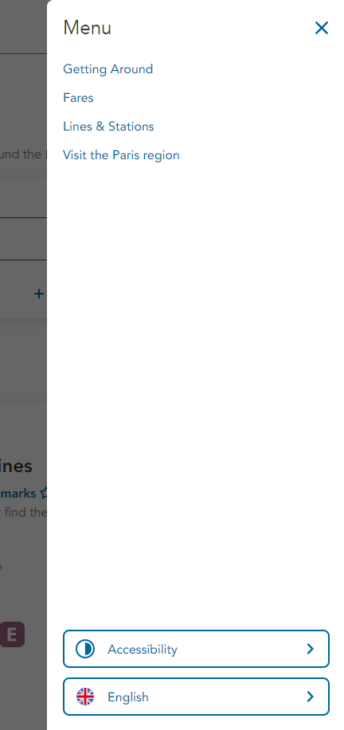
See the Modal windows sheet for details on developing this component.
Burger menu made with a show / hide panel
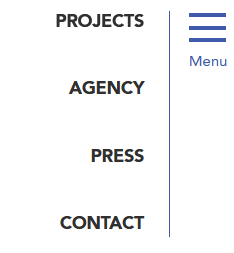
See the Show / hide panels sheet for details on developing this component.
Special feature of the burger button
- The
<nav role="navigation">tag should be used to structure the burger button. - The
aria-labelattribute must be included in the same<nav role="navigation">tag and filled in with the name of the corresponding menu (for example,aria-label="Main menu").
6 comments
-
Ce commentaire a été publié il y a plus de 2 ans. Il se peut que son contenu ne soit plus d'actualité.
Thanks for creating these guidelines, they’re a great reference.
There’s several details you don’t mention here that I’m unsure about:
– When Esc is pressed to close the menu, should you not set the focus back to the menu button?
– When the menu is open, shouldn’t it be treated as a modal, where keyboard navigation will be restricted to only the menu?-
Ce commentaire a été publié il y a plus de 2 ans. Il se peut que son contenu ne soit plus d'actualité.
Hello Travis,
Thank you for your message!
Concerning the Esc shortcut, I believe that the answer to your question is in the “Keyboard interactions” of the guidelines: If the keyboard focus is positioned on one of the menu items, Esc moves the keyboard focus to the hamburger button that triggered the menu display, and then closes it.
Concerning the modal behavior, it will depend on the visual menu opening: if it prevents user from accessing the rest of the page content (the menu opening takes all the screen for example), it could be considered as a modal. If not, a simple disclosure button can make it, without keyboard navigation restriction.
I hope this is clearer for you.
Have a good day,
Romain
-
-
Ce commentaire a été publié il y a plus de 2 ans. Il se peut que son contenu ne soit plus d'actualité.
According to W3C Recommendations the adding of role=”navigation” is allowed, but not recommended. See: https://www.w3.org/TR/html-aria/#el-nav
-
Ce commentaire a été publié il y a plus de 2 ans. Il se peut que son contenu ne soit plus d'actualité.
Hello Steffi,
Thank you for your comment.
The information is a duplicate of the nav tag to ensure a correct restitution by the screen readers. The W3C says it is not recommended, because it follows the first ARIA rule.
But in this case, there are only benefits to adding this role.
The goal here is to make the information accessible to the largest number of users, especially those who do not have access to the latest versions of screen readers, which may not render the information without this attribute.Adding the role=”navigation” (and other landmark tags) is also to be compliant with French accessibility standards (RGAA).
Regards,
Romain
-
-
Ce commentaire a été publié il y a plus de 2 ans. Il se peut que son contenu ne soit plus d'actualité.
Do we still need to put `role=”navigation”` in the since it’s nag tag and it’s not just a div tag
-
Ce commentaire a été publié il y a plus de 2 ans. Il se peut que son contenu ne soit plus d'actualité.
Hello,
Thank you for your message.
I confirm that the
role="navigation"attribute is still needed here.The information is duplicated to ensure a correct restitution by the screen readers.
The goal here is to make the information accessible to the largest number of users, especially those who do not have access to the latest versions of screen readers, which may not render the information without this attribute.
Regards,
Romain
-


Leave a Reply
Updates
- 27 October 2025
- Minor update.
- 01 December 2025
- Addition of the example of the burger menu with a modal window and rewriting of the sheet.